bilateral()
Smooth grain and JPEG noise in photos while keeping edges sharp.
From @jimp/plugin-blur
bilateral reduces noise in photos without blurring them.
Each pixel becomes an average of its neighbors, weighted both by how close they are and by how similar their color is.
Grain in flat areas such as sky, skin and walls is averaged away, but neighbors across an edge have a very different color, so they barely count and the edge stays sharp.
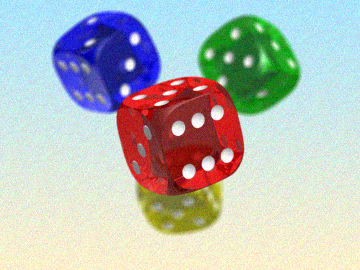
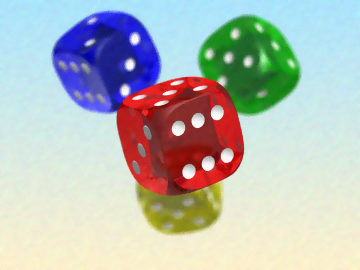
image.bilateral(). The grain is gone and the pips stay crisp.
image.gaussian(1.5) smooths the grain but softens every edge.Signature
image.bilateral(options?: { radius?: number; tolerance?: number;}): thisbilateral changes the image in place and returns it, so you can chain more calls after it.
The options type is exported from @jimp/plugin-blur as BilateralOptions.
Options
| Option | Type | Default | Description |
|---|---|---|---|
radius |
number |
2 |
How far the averaging reaches: the standard deviation of the distance weight in pixels, as in gaussian. Neighbors up to 2 × radius away count. Greater than 0, at most 5. |
tolerance |
number |
30 |
How different two colors can be, from 0 to 255, and still be averaged together: the standard deviation of the color weight, measured as the distance between RGB colors. Greater than 0, at most 255. |
Example
import { Jimp } from "jimp";
const image = await Jimp.read("photo.jpg");
image.bilateral();
await image.write("photo-clean.jpg");
Match the tolerance to the noise
tolerance should be about 3 times the noise’s standard deviation, in levels from 0 to 255.
The default of 30 suits moderate grain. Raise it for heavier noise, and lower it if fine texture such as hair or fabric is being smoothed away:
// Heavy grain, from a phone camera at nightimage.bilateral({ tolerance: 50 });
// Light JPEG noise: only smooth very similar colors, close byimage.bilateral({ radius: 1, tolerance: 15 });
A higher radius smooths larger blotches, but costs more (see below). For a stronger effect, running bilateral twice is usually better than a large radius.
Try it
The photo below has grain added. Hold the compare button to see it, then raise tolerance until the background is smooth.
image.bilateral()Smooth grain and JPEG noise but keep edges, by averaging only neighbors with a similar color.
import { Jimp } from "jimp"; const image = await Jimp.read("denoise/grain.png"); // Change an option to run it await image.write("output.png");
Notes
- Specks are a job for
median. A black or white speck has no neighbors of a similar color, sobilateralleaves it alone. Usemedianfor salt-and-pepper noise, dust and dead pixels. - Too high a tolerance blurs. When
toleranceis larger than the contrast of an edge, colors on both sides count and the edge softens, as withgaussian. With a very high tolerance, flat areas can also start to look like a painting. - Speed. Every pixel looks at each neighbor in a circle of radius
2 × radius, so the cost grows withradius². A 1200×630 photo, the size of an Open Graph image, takes about 45ms withradius: 1, 100ms with the defaultradius: 2and 190ms withradius: 3in Node.js on a laptop. The radius is capped at5(about 0.6s for that photo). - Transparency is handled. Colors are weighted by their alpha, so transparent pixels don’t pull colors toward black. Alpha isn’t changed, and fully transparent pixels are left as they are.
- Edges are extended. Pixels past the border count as copies of the nearest edge pixel.
- Validation. The options are checked with zod. A
radiusof0or less or above5, or atoleranceof0or less or above255, throws a validation error. - The whole image.
bilateralhas no region option. To smooth part of an image, such as a face, filter a cropped copy andcompositeit back. - Added in 2.2.