colorGrade()
Color grade with a 3D LUT from a .cube file or a Hald image.
From @jimp/plugin-lut
colorGrade color grades an image with a 3D LUT (lookup table): a grid that gives a new color for every input color.
LUTs are how photo and video editors share a “look”, such as a film emulation or a teal and orange grade, so you can apply the same look in Jimp that you made in DaVinci Resolve, Premiere, Photoshop or darktable.
| Original | teal-orange |
|---|---|
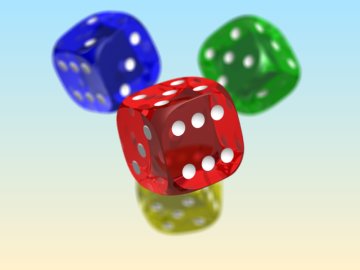 |
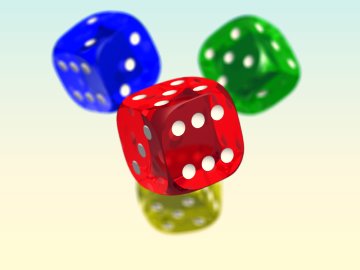 |
faded-film |
bleach-bypass |
|---|---|
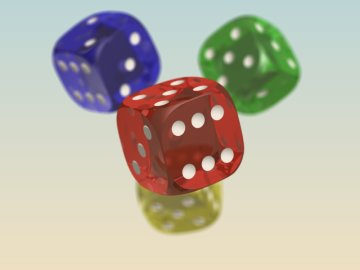 |
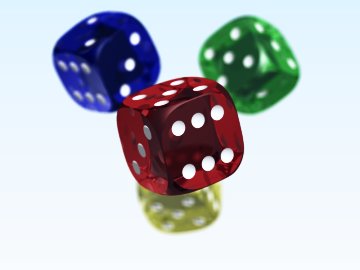 |
Signature
image.colorGrade(lut: Lut | JimpInstance, options?: { strength?: number }): thiscolorGrade changes the image in place and returns it, so you can chain more calls after it.
The Lut and ColorGradeOptions types are exported from jimp.
Parameters
| Parameter | Type | Default | Description |
|---|---|---|---|
lut |
Lut | JimpInstance |
required | A LUT from a .cube file, read with parseCubeLut, or a Hald CLUT image. |
options.strength |
number |
1 |
How much of the graded colors to use, from 0 (the original image) to 1 (the LUT’s colors). Values in between blend the two. Clamped to 0–1. |
Example
import { readFile } from "node:fs/promises";import { Jimp, parseCubeLut } from "jimp";
const lut = parseCubeLut(await readFile("teal-orange.cube", "utf8"));const image = await Jimp.read("photo.jpg");
image.colorGrade(lut);
await image.write("photo-graded.jpg");
A parsed LUT is plain data. Parse it once and reuse it for every image.
In a browser, fetch the file’s text instead: parseCubeLut(await (await fetch("teal-orange.cube")).text()).
A subtler grade
Pass strength to blend the grade with the original colors:
image.colorGrade(lut, { strength: 0.5 });strength: 1 |
strength: 0.5 |
|---|---|
|
 |
Hald CLUT images
A Hald CLUT is a LUT stored as an image, the format many film emulation packs use.
Read it with Jimp.read and pass the image:
import { Jimp } from "jimp";
const hald = await Jimp.read("kodachrome.png");const image = await Jimp.read("photo.jpg");
image.colorGrade(hald);
A level L Hald image is a square of L³ × L³ pixels, with L² points along each axis: 512 × 512 for level 8 (64 points), 1728 × 1728 for level 12 (144 points).
Its colors are read in place, so a large Hald image doesn’t need extra memory.
Any other size throws A Hald CLUT image must be square, with a side of level³ pixels, like 512 × 512 for level 8. This one is 400 × 300.
Try it
Pick a look and drag the strength slider. Hold the compare button to see the original.
The looks are Hald CLUT images: teal-orange.png, faded-film.png and bleach-bypass.png. The teal and orange look is also available as teal-orange.cube.
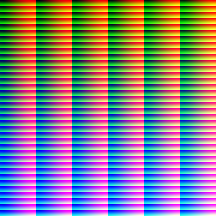
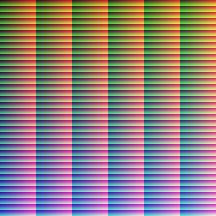
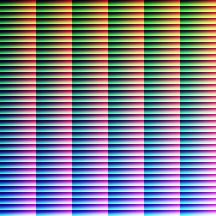
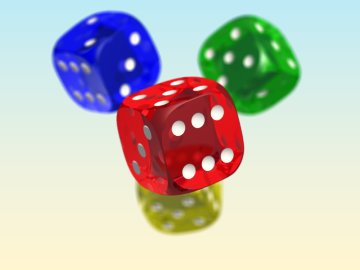
image.colorGrade(await Jimp.read("lut/teal-orange.png"))Color grade with a 3D LUT, here a Hald CLUT image. strength blends with the original.
import { Jimp } from "jimp"; const image = await Jimp.read("dice-on-paper.png"); // Change an option to run it await image.write("output.png");
With apply, workers and the image server
apply and JSON
["colorGrade", lut, { strength: 0.5 }] works in apply.
A parsed LUT’s data is a Float32Array, which JSON.stringify doesn’t keep as an array.
To store a LUT as JSON, convert it to a plain array first, since colorGrade accepts one:
const json = JSON.stringify({ ...lut, data: Array.from(lut.data) });
image.apply([["colorGrade", JSON.parse(json), { strength: 0.5 }]]);
A .cube file is often smaller than this JSON, so for saved presets you can also keep the file’s text and parse it when you load the preset.
Workers
A parsed LUT and a Hald image can both be sent to a worker in a task’s edits. They’re copied to the worker with every task:
const bytes = await jimp.run({ input: "photo.jpg", edits: [["colorGrade", lut, { strength: 0.8 }]], output: { mime: "image/jpeg" },});Image server
A LUT is too large to put in a URL, so @jimp/server doesn’t allow the colorGrade edit.
Instead, load your LUTs on the server and add a method that applies one by name.
Then a signed URL can ask for a look with the edits param, like [["look", "teal-orange", { "strength": 0.5 }]]:
import { readFile } from "node:fs/promises";import { createJimp } from "@jimp/core";import { defaultFormats, defaultPlugins, parseCubeLut } from "jimp";import { methods as lutMethods } from "@jimp/plugin-lut";import type { JimpClass } from "@jimp/types";import { createImageHandler, defaultAllowedEdits, fetchSource } from "@jimp/server";
const looks = {  "teal-orange": parseCubeLut(await readFile("luts/teal-orange.cube", "utf8")),  "faded-film": parseCubeLut(await readFile("luts/faded-film.cube", "utf8")),};
const Jimp = createJimp({  formats: defaultFormats,  plugins: [    ...defaultPlugins,    {      /** Grade the image with one of the server's LUTs */      look<I extends JimpClass>(image: I, name: string, options?: { strength?: number }) {        if (!Object.hasOwn(looks, name)) {          throw new Error(`There's no look called "${name}"`);        }
        return lutMethods.colorGrade(image, looks[name as keyof typeof looks], options);      },    },  ],});
const handler = createImageHandler({  Jimp,  source: fetchSource({ baseUrl: "https://assets.example.com/" }),  secret: process.env.IMAGE_SECRET,  allowedEdits: [...defaultAllowedEdits, "look"],});
An unknown name responds with 400 and the method’s error.
Notes
- Tetrahedral interpolation. Each color is between eight points of the LUT’s grid.
colorGradesplits that cell into six tetrahedra and blends the four corners of the one the color is in. This is the tetrahedral option in DaVinci Resolve and in FFmpeg’slut3dfilter. It’s more accurate than trilinear interpolation, which blends all eight corners: grays, for example, are blended only from points on the gray axis. Results match FFmpeg’s to within one level, since FFmpeg truncates to 8 bits where Jimp rounds. - Alpha is unchanged. The colors of transparent pixels are graded too.
- Outputs are clamped to
0–255..cubefiles may have outputs outside0–1. - Inputs outside the LUT’s domain are clamped. A
.cubefile’sDOMAIN_MINandDOMAIN_MAX(orLUT_3D_INPUT_RANGE) set which input colors the grid covers. The default is0to1, every color. - Use LUTs made for photos. A LUT expects colors in a particular encoding. Creative LUTs and film emulations for Rec. 709 or sRGB suit JPEGs and PNGs. Camera LUTs that convert log footage (such as S-Log3 or V-Log to Rec. 709) expect log input and make ordinary photos look wrong.
- Hald images must be lossless. Use a PNG: JPEG compression changes the colors the LUT stores. The Hald image’s alpha is ignored.
- Speed. The cost per pixel doesn’t depend on the LUT’s size, so a 65-point LUT is as fast to apply as a 17-point one. Only parsing a larger
.cubefile takes longer. - Invalid LUTs throw a
ZodError, for exampledata must have size³ × 3 = 107811 numbers, got 107810. SeeparseCubeLutfor the errors in.cubefiles. - Custom Jimp.
colorGradeis in@jimp/plugin-lut. Add itsmethodsto the plugins of a custom Jimp to use it there. - Added in 2.2.