cover scales the image until it fills a w × h box, keeping its aspect ratio, then crops whatever sticks out.
The result is always exactly w × h, like CSS object-fit: cover. It’s the usual choice for thumbnails, avatars and banners.
Signature
image.cover(options: {  w: number;  h: number;  align?: number | { x?: number; y?: number } | "entropy" | "attention";  mode?: ResizeStrategy;  premultiplyAlpha?: boolean;}): this
image.coverRect(options: {  w: number;  h: number;  align?: number | { x?: number; y?: number } | "entropy" | "attention";}): { x: number; y: number; w: number; h: number }
cover changes the image in place and returns it, so you can chain more calls after it.
coverRect doesn’t change the image: it returns the part of it that cover would keep.
Options
| Option | Type | Default | Description |
|---|---|---|---|
w |
number |
required | The output width in pixels. |
h |
number |
required | The output height in pixels. |
align |
number, { x?, y? }, "entropy" or "attention" |
centered | Which part of the image to keep: HorizontalAlign and VerticalAlign flags, { x, y } fractions from 0 to 1, or a strategy that looks at the image. See Alignment and Smart cropping. |
mode |
ResizeStrategy |
built-in resizer | The resampling algorithm. See resize strategies. |
premultiplyAlpha |
boolean |
true |
Treat alpha as opacity. Pass false when alpha holds other data, to keep the color of transparent pixels. See Alpha that isn’t opacity. |
Example
import { Jimp } from "jimp";
const image = await Jimp.read("photo.jpg");
// 800 x 600 is scaled to 400 x 300, then 50 px is cut from each sideimage.cover({ w: 300, h: 300 });
await image.write("thumbnail.jpg");
Alignment
align decides which part of the scaled image is kept when it’s cropped.
Only the direction that overflows matters. A wide image in a square box is cropped left and right, so only the horizontal value has an effect.
With flags
Combine at most one HorizontalAlign value and one VerticalAlign value with |:
import { Jimp, HorizontalAlign, VerticalAlign } from "jimp";
const image = await Jimp.read("portrait.jpg");
// Keep the top of a tall photo, where the face usually isimage.cover({ w: 300, h: 300, align: VerticalAlign.TOP });| Value | Keeps |
|---|---|
HorizontalAlign.LEFT |
the left edge |
HorizontalAlign.CENTER |
the middle (default) |
HorizontalAlign.RIGHT |
the right edge |
VerticalAlign.TOP |
the top edge |
VerticalAlign.MIDDLE |
the middle (default) |
VerticalAlign.BOTTOM |
the bottom edge |
A direction you leave out is centered, so VerticalAlign.TOP is the same as HorizontalAlign.CENTER | VerticalAlign.TOP.
With fractions
Pass { x, y } to pick any position between the edges, like the percentages of CSS object-position.
0 keeps the left or top edge, 0.5 the middle and 1 the right or bottom edge:
// Like CSS object-position: center 20%image.cover({ w: 150, h: 100, align: { x: 0.5, y: 0.2 } });A missing x or y is centered (0.5), and values outside 0 to 1 are clamped.
Smart cropping
A fixed alignment doesn’t know where the subject is. When the subject is off-center, as in many avatars and cover photos, a centered crop can cut it in half.
Pass a strategy as align and cover looks at the image to choose what to keep, like the position strategies of sharp:
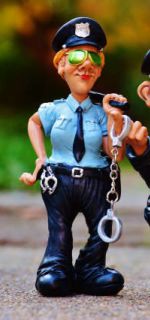
"entropy"keeps the most detailed part: the window whose brightness histogram holds the most information. Busy areas win over flat sky, walls and backgrounds."attention"keeps the part people tend to look at: strong edges, saturated color and skin tones, weighted towards the middle of the window so one subject is framed rather than two cut in half.
import { Jimp } from "jimp";
const image = await Jimp.read("team-photo.jpg");
// A tall card from a wide photoimage.cover({ w: 150, h: 320, align: "attention" });
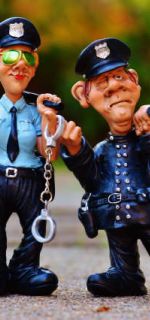
This photo is 640 × 426. Here it is covered to 150 × 320, which keeps only a narrow strip:
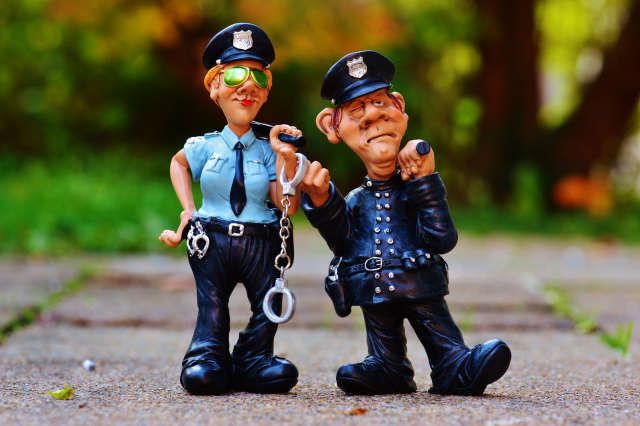
| Centered (default) | "entropy" |
"attention" |
|---|---|---|
 |
 |
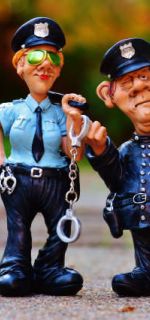 |
Only the axis that overflows moves: a wide image in a tall box is searched from left to right, and a tall image in a wide box from top to bottom. Both strategies analyse a copy that is at most 256 pixels on its longest side, so they take a few milliseconds even for large photos, and the same image always gives the same crop. Transparent pixels count for nothing.
They are heuristics, not face detection. A skin-colored wall can draw "attention", and a noisy background can draw "entropy".
When you know where the subject is, pass it as { x, y } fractions instead.
Measure the crop
coverRect takes the same w, h and align and returns the rectangle of the original image that cover would keep, without changing it.
Use it to crop at full resolution, to show the crop so someone can adjust it, or to work out a smart crop once and store it:
// The 640 × 426 photo above, for a 1200 × 630 Open Graph cardconst rect = image.coverRect({ w: 1200, h: 630, align: "attention" });// { x: 0, y: 3, w: 640, h: 336 }
// Same framing, without scalingimage.crop(rect);
Try it
Set the box with w and h, then change the alignment to choose which part of the dice is kept.
Switch align with to { x, y } fractions to use sliders instead of flags, or to "entropy" or "attention" to let cover choose.
image.cover({ w: 160, h: 240 })Scale the image until it fills a w x h box, then crop the overflow. The alignment picks which part is kept, or "entropy" and "attention" pick it by looking at the image.
import { Jimp } from "jimp"; const image = await Jimp.read("dice.png"); // Change an option to run it await image.write("output.png");
Notes
- It enlarges too. An image smaller than the box is scaled up until it fills it.
- Invalid flags. Two flags for one direction (such as
HorizontalAlign.LEFT | HorizontalAlign.RIGHT), unknown bits or a fractional number throwalign must combine at most one HorizontalAlign and one VerticalAlign flag.align: 0has no flags, so it’s centered. - Strategies in other places.
renderimages take them asobjectPositionwithfit: "cover", and the image server aspos=entropyorpos=attention.containdoesn’t take them, since it keeps the whole image. - Added in 2.2: the
"entropy"and"attention"strategies foralign, andcoverRect. - Added in 2.0:
{ x, y }fractions foralign, thepremultiplyAlphaoption, and theLANCZOS,LANCZOS2andMITCHELLstrategies. - Changed in 2.0: a direction left out of
alignis centered, and any invalid combination of flags throws. Before, a missing direction aligned to the left or top, and two flags in one direction were accepted unless both directions were invalid.