median()
Remove specks and salt-and-pepper noise with a median filter.
From @jimp/plugin-blur
median replaces each pixel with the median of the square of pixels around it, one channel at a time.
A few outliers don’t change a median, so isolated specks, dust, dead pixels and salt-and-pepper noise disappear, while edges stay sharp instead of blurring.
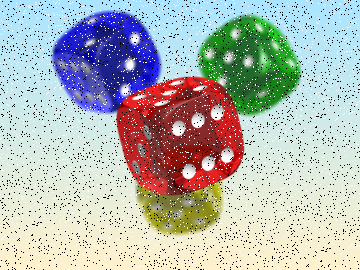
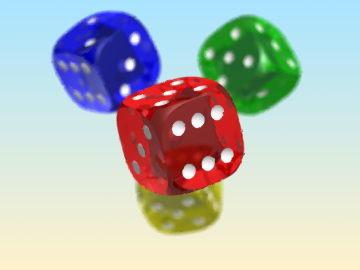
image.median(1)Signature
image.median(radius: number): thismedian changes the image in place and returns it, so you can chain more calls after it.
Parameters
| Parameter | Type | Default | Description |
|---|---|---|---|
radius |
number |
required | How far the window reaches: it’s a square of 2 × radius + 1 pixels on each side. Greater than 0, rounded to a whole number from 1 to 256. |
Example
import { Jimp } from "jimp";
const image = await Jimp.read("scan.png");
image.median(1);
await image.write("scan-clean.png");
Bigger specks
A speck is removed when it covers less than half the window. median(1) (3×3) removes single pixels, median(2) (5×5) removes specks up to about 3 pixels across:
image.median(2);Larger radii also round off corners and erase lines thinner than the window, which gives photos a painted look.
Try it
The photo below has black and white specks. Hold the compare button to see the original, and raise radius to see the painted look of larger windows.
image.median(1)Replace each pixel with the median of the square around it. Removes specks and salt-and-pepper noise and keeps edges sharp.
import { Jimp } from "jimp"; const image = await Jimp.read("denoise/specks.png"); // Change an option to run it await image.write("output.png");
Notes
- Matching sharp and ImageMagick.
median(radius)uses a window2 × radius + 1pixels wide, somedian(1)matches sharp’smedian(3)and ImageMagick’s-statistic Median 3x3. - Grain is a job for
bilateral. The grain of a photo taken in low light, or the noise around JPEG edges, isn’t made of outliers, so a median leaves it blotchy. Usebilateralfor that, andmedianfor specks. - Speed. The window slides along each row with a histogram per channel, so each step adds one column and removes another, and nothing is sorted. The cost grows with
radius, notradius². A 1200×630 photo takes about 35–60ms withmedian(1), 80–90ms withmedian(5)and 140–160ms withmedian(10)in Node.js on a laptop. - Transparency is handled. Colors are weighted by their alpha, so transparent pixels don’t darken a shape’s edges. Alpha is the median of the alpha values, and fully transparent results are written as transparent black.
- Edges are extended. Pixels past the border count as copies of the nearest edge pixel, as in
blurandgaussian. - Invalid radii. A non-number,
NaN,0or less throws a validation error. Radii above256work like256, as inblur. - The whole image.
medianhas no region option. To clean part of an image, filter a cropped copy andcompositeit back. - Added in 2.2.