grain()
Add film grain that's the same every time, or just enough noise to hide gradient banding.
From @jimp/plugin-color
grain adds film grain: random-looking noise that’s the same every time you call it with the same options. Use it for a film look, or turn it down to hide the bands that large, smooth gradients get in 8-bit images, especially after JPEG compression.
Signature
image.grain(options?: GrainOptions): this
interface GrainOptions {  amount?: number;  size?: number;  monochrome?: boolean;  seed?: number;}
grain changes the image in place and returns it, so you can chain more calls after it.
GrainOptions is exported from jimp as a type.
Options
| Option | Type | Default | Description |
|---|---|---|---|
amount |
number |
0.1 |
How strong the grain is, from 0 to 1. Each pixel moves by at most amount × 255 levels, and usually by much less. 0 changes nothing. |
size |
number |
1 |
Roughly how wide a grain is in pixels, from 1 to 16. At 1 every pixel gets its own noise; bigger sizes give softer clumps of the same strength. |
monochrome |
boolean |
true |
true changes red, green and blue by the same amount, so only brightness changes, like black-and-white film. false gives each channel its own noise. |
seed |
number |
0 |
A whole number that picks the pattern. The same seed always gives the same grain. |
Example
import { Jimp } from "jimp";
const image = await Jimp.read("photo.jpg");
image.grain({ amount: 0.15, size: 1.5 });
await image.write("photo-grain.jpg");
Hide banding in gradients
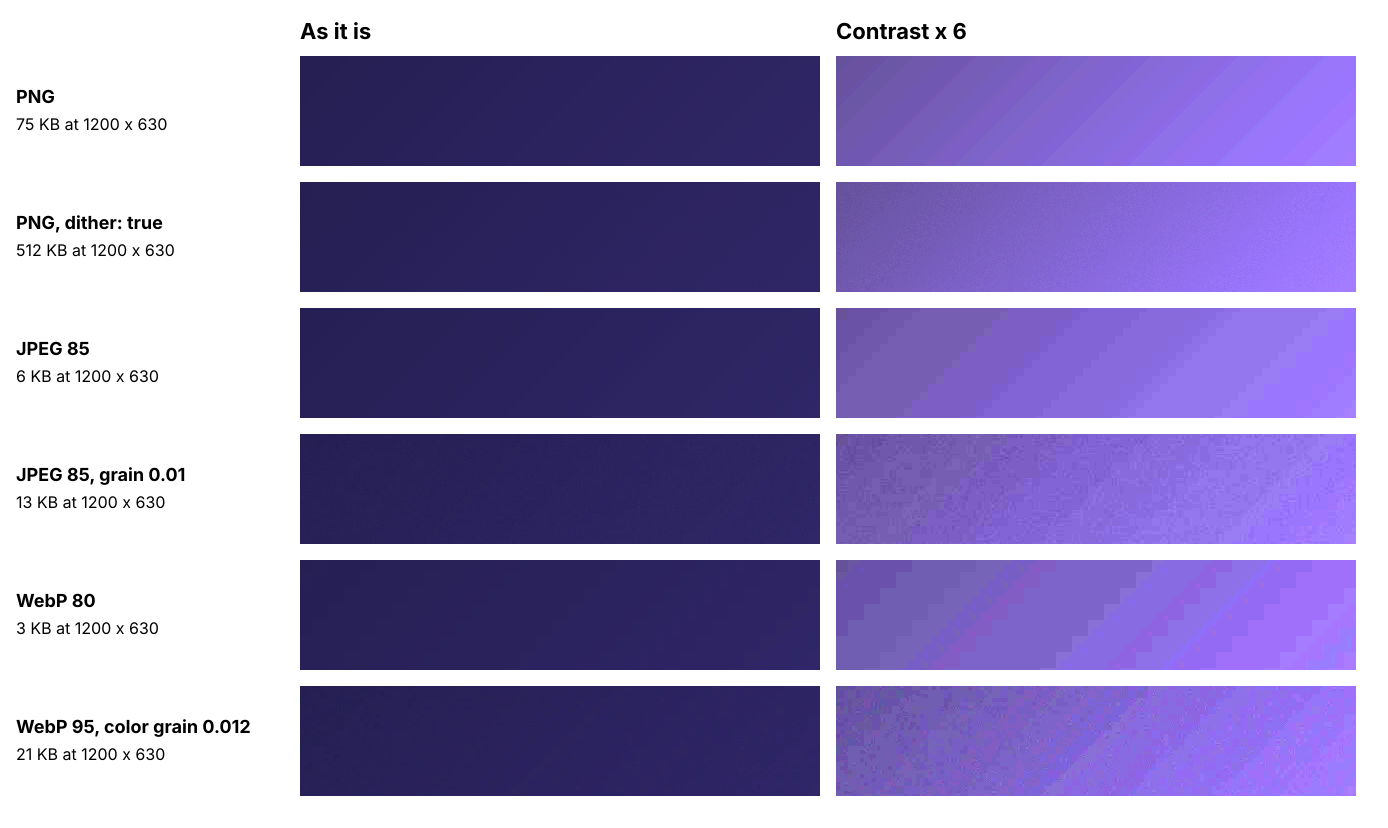
A wide gradient between two close colors has only a few levels to step through, so it shows flat bands. A little grain breaks up the edges between them. amount: 0.01 moves each pixel by at most about 2.5 levels: invisible as grain, but it survives JPEG compression, which smooths away weaker noise:
const card = await render(<OgCard post={post} />, {  width: 1200,  height: 630,  Jimp,});
card.grain({ amount: 0.01 });
const jpeg = await card.getBuffer("image/jpeg", { quality: 85 });
For lossy WebP, use colored grain (monochrome: false) and a high quality such as 95: WebP’s bands are mostly in the color, not the brightness. For PNG, dither the gradient itself instead with dither: true. It adds less noise, so it doesn’t affect the rest of the image.
Animated grain
Change seed for each frame so the grain moves, like film:
const frames = images.map((image, i) => image.grain({ seed: i }));Try it
Change the strength and size, and switch off monochrome for colored noise.
image.grain()Add film grain. The same options and seed always give the same grain. A little hides banding in gradients.
import { Jimp } from "jimp"; const image = await Jimp.read("dice-on-paper.png"); // Change an option to run it await image.write("output.png");
Notes
- The same every time. The noise comes from a hash of each pixel’s position and the seed, not
Math.random, so the same image and options give the same bytes in Node.js, browsers, workers and@jimp/server. Snapshots and caches keep working. A pixel’s grain depends only on its position, so a bigger image has the same grain in the part that overlaps a smaller one. - The noise. At
size: 1the noise has a triangular distribution: the sum of two random numbers, the shape used for dithering audio and images. Bigger sizes blur per-pixel noise with a Gaussian aboutsizepixels wide, then scale it back up to the same strength. - Alpha is unchanged. Only red, green and blue change, and fully transparent pixels are skipped.
- Clipping. Values are clamped to
0–255, so grain on pure black can only brighten and on pure white can only darken. - Speed. A 1200 × 630 image takes about 20 ms at
size: 1and 70 ms atsize: 16. Withmonochrome: falseit takes about three times as long. - Validation. The options are checked with zod. An
amountoutside0–1, asizeoutside1–16, or aseedthat isn’t a whole number throws a validation error. - Added in 2.2.